Skip to content

Dental patient records · Philippines

Your Dental Clinic's Patient Records, Organized in One Place.

ALM DentaSync helps dental clinics move beyond paper patient booklets and scattered files with a digital workspace for patient information, medical and dental history, treatment records, and supporting documents.

Already using DentaSync? Sign in to your clinic

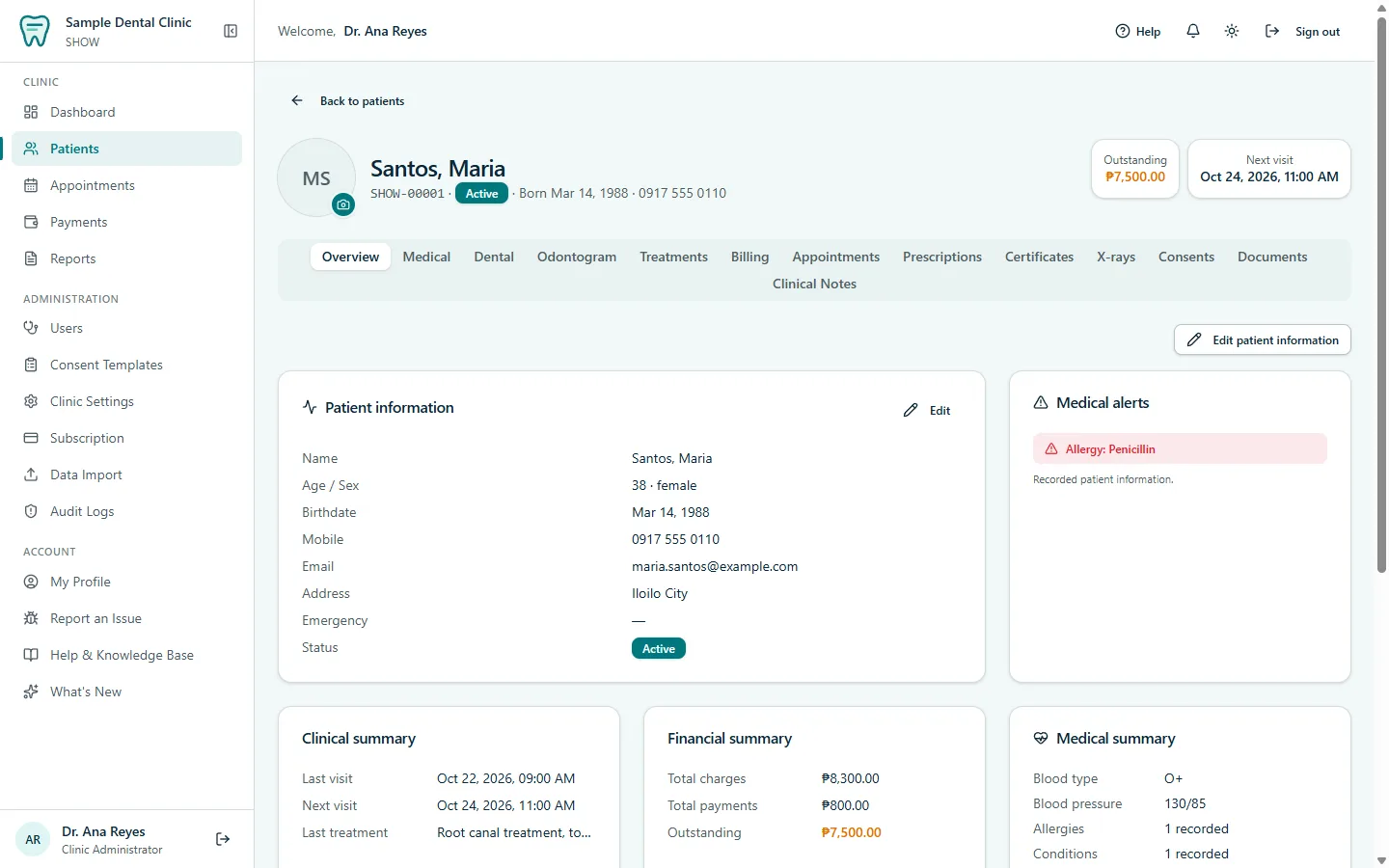
ALM DentaSync patient profile overview showing patient details, medical alerts and recent treatments for a sample patient
ALM DentaSync screen, shown with sample data.

The problems we solve

Paper records make simple things slow

Many clinics still keep patient records in booklets and folders. These are common challenges that DentaSync is designed to help with — your clinic may face some of them, or all of them.
  • Finding old records

    A returning patient's booklet has to be found in a cabinet or a box before the visit can start.

  • Keeping history together

    Medical history, dental history and treatment notes end up on different pages, written by different people over the years.

  • Locating consent and documents

    Signed consent forms, X-rays and referral letters are filed separately, and the one you need is not always where it should be.

  • Handling paper at every visit

    Booklets are carried to the chair, to the front desk and back again, and wear out or go missing along the way.

  • Changing without disruption

    Moving to digital records can feel like a project the clinic has no time for while patients are still coming in.

Why clinics use it

What changes when records are in one place

  • Find patient records more easily

    Search by name, patient code, mobile number or email instead of looking through folders.

  • Keep patient information organized

    History, chart, treatments, consent, documents and billing sit in one profile, on their own tabs.

  • See the clinical picture in one place

    Medical alerts, recent treatments and documents are on the patient's overview before the visit starts.

  • Rely less on scattered paper

    Consent forms, prescriptions, certificates and X-ray reports are created, numbered and kept in the record.

  • Build an organized digital routine

    Start with the patients you see this week and add records visit by visit, at the clinic's own pace.

Features

Everything in the patient record, on its own tab

Every feature on this page is available in ALM DentaSync today. Screens are from the app, shown with sample data.

Patient profiles and search

Each patient has one profile: personal and contact details, medical alerts, history, odontogram, treatments, billing, appointments and documents, each on its own tab. Find a patient by name, patient code, mobile number or email.

  • Automatic patient codes and a duplicate-name check before saving
  • Medical alerts, recent treatments and documents on the overview
  • Each staff member sees only the tabs their role allows
Helps with
Searching folders and booklets for an old record.
In your workflow
Register the patient on their first visit, then open the same profile at every visit after that.

One profile, thirteen tabs

  • Overview
  • Medical
  • Dental
  • Odontogram
  • Treatments
  • Billing
  • Appointments
  • Prescriptions
  • Certificates
  • X-rays
  • Consents
  • Documents
  • Clinical Notes

Long histories load page by page, and each tab has its own search, filters and sort.
Medical and dental history

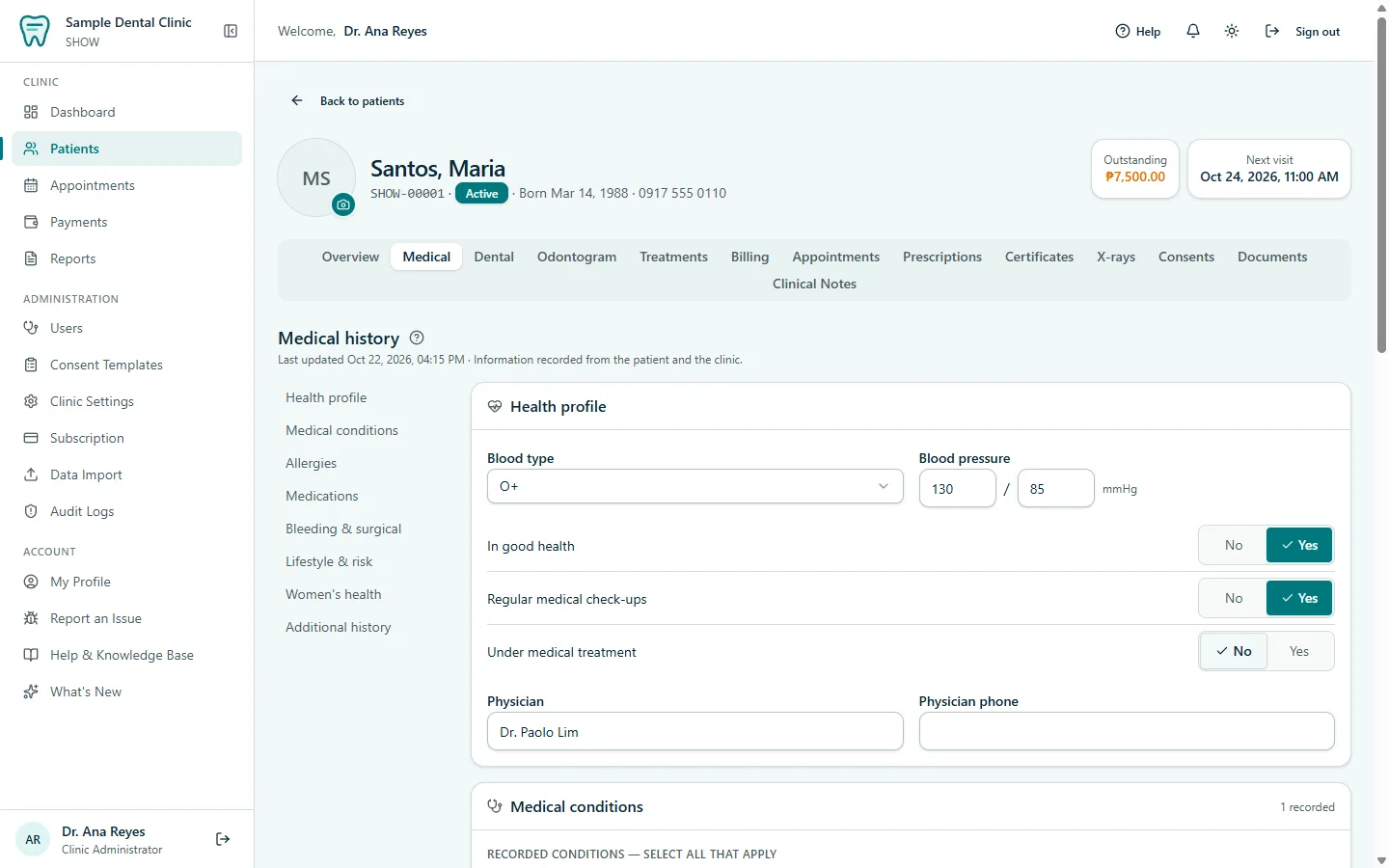
A structured medical history follows the questions of a clinic's medical-history form: health profile, conditions, allergies, medications, bleeding and surgical history, lifestyle and women's health. The Dental tab holds dental history and a dental assessment.

  • Dental assessment: periodontal screening, occlusion, appliances and TMD findings
  • Shows what was recorded; DentaSync does not interpret medical information
  • Viewed and updated by dentists and clinic administrators
Helps with
History written on different pages, or hard to find when it matters.
In your workflow
The dentist records and updates it; allergies and key items appear as medical alerts on the patient's overview.
ALM DentaSync Medical tab with health profile, medical conditions and allergies sections for a sample patient
ALM DentaSync screen, shown with sample data.

Interactive odontogram

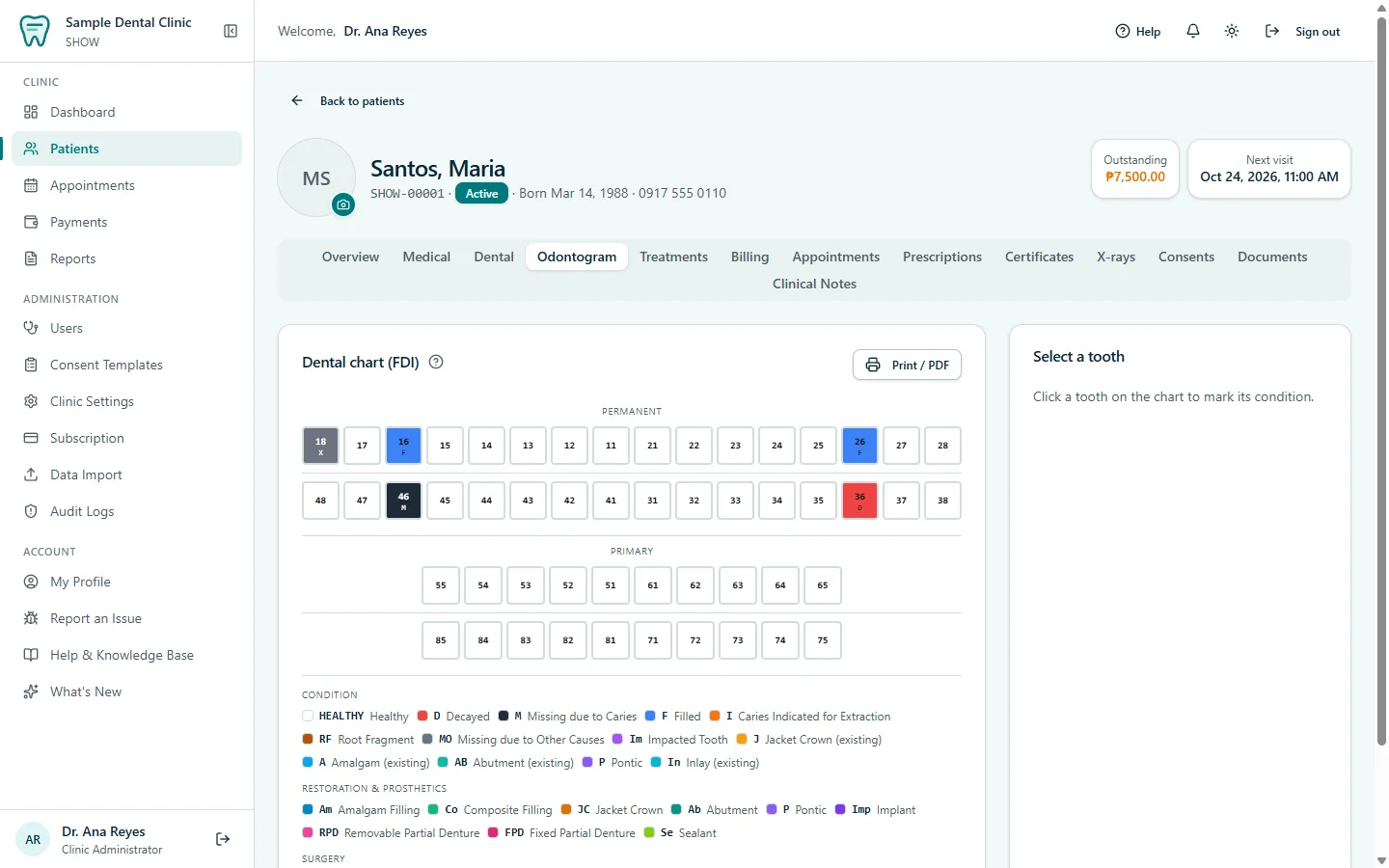
An FDI tooth chart. Select a tooth, choose the surface and a condition, restoration or surgery code, and the chart updates straight away. Each tooth keeps a timeline of its marks and treatments.

  • Tooth timeline with who recorded each mark
  • Print or save the chart as PDF on your clinic letterhead
  • Dentists and dental assistants chart; receptionists can view
Helps with
Hand-drawn charts that are hard to read, update or copy.
In your workflow
Chart during the examination; the timeline builds up visit by visit.
ALM DentaSync odontogram showing an FDI tooth chart with marked teeth for a sample patient
ALM DentaSync screen, shown with sample data.

Appointments

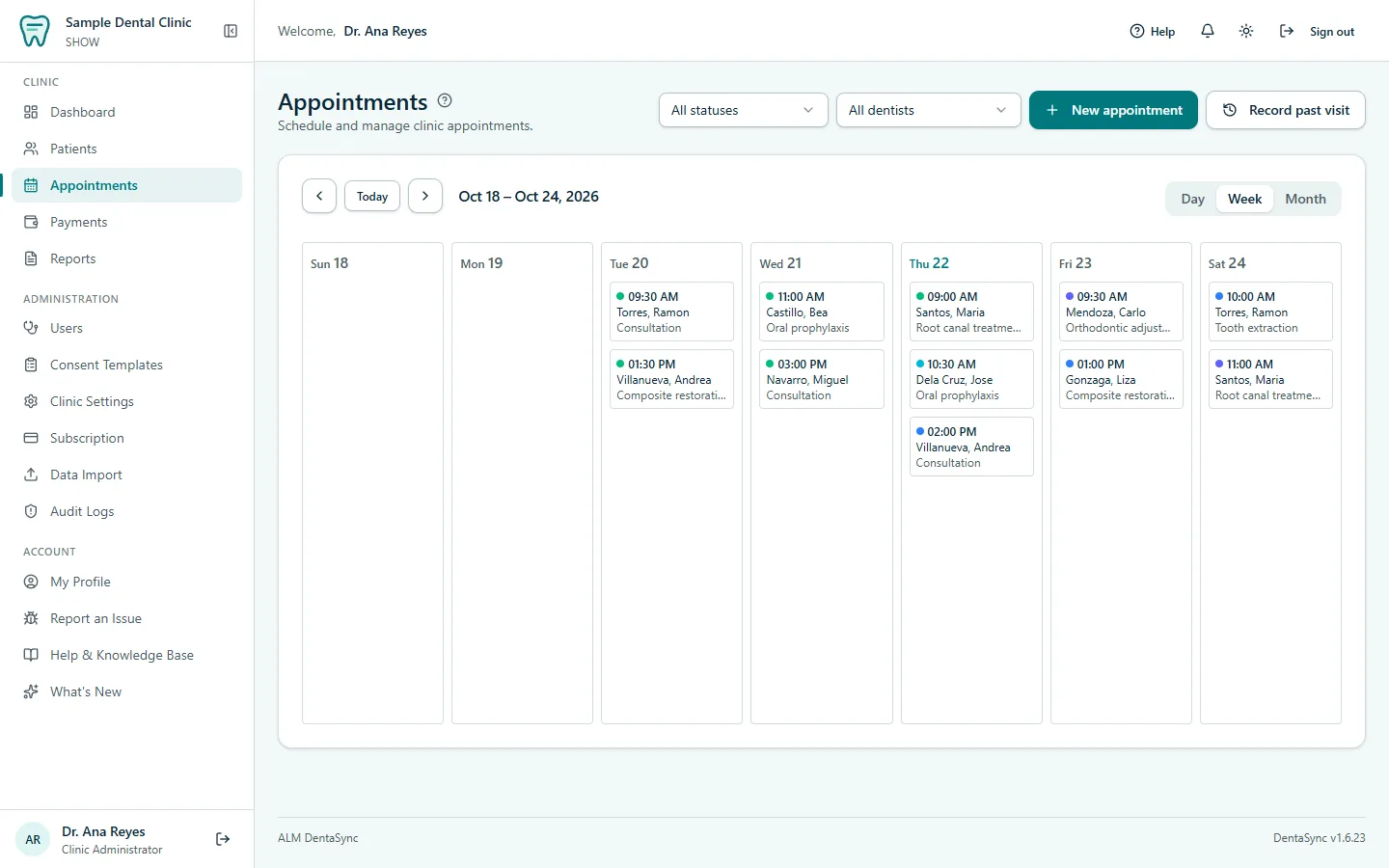
Day, week and month views of the clinic schedule, filtered by dentist or status. Track each visit from scheduled and confirmed through checked in, completed, cancelled or no show.

  • Record walk-ins and past visits
  • Today's schedule on the dashboard
  • Managed by clinic administrators, dentists and receptionists
Helps with
An appointment book kept apart from the patient's records.
In your workflow
Schedule a visit for a patient; it appears on the calendar, on the dashboard on the day, and on the patient's profile.
ALM DentaSync appointments calendar in week view with sample appointments
ALM DentaSync screen, shown with sample data.

The rest of the record workflow

  • Treatment records

    Record the procedure, date, treating dentist and, where relevant, tooth and surface. Update the status as care progresses, add clinical events for ongoing treatment, and link follow-up visits and notes.

    Helps with
    Treatment notes scattered across booklet pages.
    In your workflow
    Each treatment stays on the patient's profile with its history and, for charged treatments, what was paid and is still due.
  • Patient documents and X-ray reports

    Upload PDF, PNG, JPEG or WebP files (up to 25 MB) to the patient's record by category: X-ray, photo, report, consent or other. Write X-ray reports with findings and recommendations, issued as numbered PDFs.

    Helps with
    Supporting documents kept in separate envelopes and folders.
    In your workflow
    Files sit on the patient's Documents tab, searchable by name, category and date, and open through short-lived secure links.
  • Prescriptions and dental certificates

    Write prescriptions with each medicine's dose, instructions and quantity, and issue dental certificates. Both print on your clinic letterhead with your logo; certificates can carry the dentist's digital signature.

    Helps with
    Handwritten pads and certificates with no copy on file.
    In your workflow
    Each one is numbered and kept on the patient's profile. Issued certificates are locked, and their PDF is archived.
  • Patient billing and receipts

    Charges come from recorded treatments. Record payments by cash, GCash, Maya, bank transfer or card, print official receipts, and print a statement of account with the running balance.

    Helps with
    Balances tracked on paper, separate from the treatment record.
    In your workflow
    Overpayments become patient credit automatically. A payment entered by mistake is voided with a reason, never deleted.
  • Dashboard and reports

    A daily dashboard with today's appointments and what needs attention. Reports for a date range: patient registrations, appointments, treatments, payments collected, outstanding balances and dentist productivity.

    Helps with
    Counting visits and collections by hand.
    In your workflow
    Export any report as CSV to open it in a spreadsheet. Financial figures are shown only to roles that handle billing.
  • Staff accounts and roles

    Every staff member signs in with their own account as a Clinic Administrator, Dentist, Receptionist or Dental Assistant. Screens follow the role, and the same rules are enforced on the server.

    Helps with
    Everyone sharing one notebook, with no record of who changed what.
    In your workflow
    The clinic administrator adds and removes staff. A deactivated account loses access immediately, even on a device that is still signed in.
  • Spreadsheet import

    Clinic administrators can import patients, treatments and payments from CSV or Excel files, matching your columns to DentaSync's fields. Every row is checked; rows with problems are listed instead of imported.

    Helps with
    Retyping records the clinic already keeps in a spreadsheet.
    In your workflow
    Import patients first, then their treatments and payments. Paper records are not scanned or converted automatically.

Who DentaSync is for

Made for small and independent dental clinics

  • Solo dental practitioners
  • Small, independent dental clinics
  • Clinics still using paper patient booklets and folders
  • Clinics that want each patient's information in one place
  • Practices planning a gradual move to digital records

DentaSync is a practical option for a clinic that needs organized patient records without a large hospital information system. It runs in the browser, so there is nothing to install, and each clinic's records are kept separate from every other clinic's.

It covers the day-to-day record of a dental practice: registration, history, charting, treatment, consent, documents, scheduling and patient billing.

How it works

Getting started, one step at a time

Clinic accounts are set up by ALM IT Solutions — there is no public sign-up.
  1. 1

    Discuss your clinic's workflow

    Tell us how your clinic keeps records today and what it needs. We show you DentaSync and answer your questions.

  2. 2

    Set up your clinic

    ALM IT Solutions creates your clinic account and its first clinic administrator. The administrator adds the clinic's details, logo and staff, each with their own account and role.

  3. 3

    Organize patient records

    Register new and returning patients as they visit. Records kept in a spreadsheet can be imported. Moving existing paper records is planned with you; they are not scanned or converted automatically.

  4. 4

    Start using DentaSync

    Use it at each visit for history, charting, treatments, consent and documents. The built-in Help Center has a guide for every screen.

Pricing

One simple monthly subscription

Per clinic

₱1,500 / month

VAT inclusive — no setup fee or other charges.

Request a Demo
  • Billed monthly in advance; the invoice is issued on the 1st of the month.
  • 7-day grace period to pay each invoice.
  • No cancellation fee. Cancel with 30 days' written notice.
  • After cancellation, read-only access to your records for 6 months so you can view, print and export them.
  • A clinic's signed contract can set a different fee.
  • Read the full Subscription & Billing terms

Privacy and security

Safeguards built into how DentaSync works

Clinics are responsible for their patients' information; DentaSync gives them tools to protect it. This is what is in place today.
  • Clinic data separation

    Each clinic's records are kept separate from every other clinic's, and the database enforces this on every request.

  • Role-based access

    What each person can see and do depends on their role, and the same rules are enforced on the server, not only on screen.

  • Sign-in protections

    Every clinical page requires signing in. Repeated failed attempts temporarily block further sign-in, and deactivated accounts lose access immediately.

  • Audit log

    Important actions are recorded in an audit log that clinic administrators can review. Clinic staff cannot edit or delete its entries.

  • Private documents

    Uploaded files and patient photos are stored privately and opened only through short-lived links. Connections are encrypted (HTTPS).

  • Managed hosting

    The Service runs on Lovable Cloud and is delivered through Cloudflare's network. Stored data is protected by the providers' managed security, including encryption.

What we do not claim

DentaSync does not hold independent security certifications such as ISO 27001 or SOC 2, and no software can remove every risk. Using DentaSync does not by itself make a clinic compliant with the Data Privacy Act; the clinic remains responsible for how it collects and uses patient information.

Planned: two-factor authentication for clinic user accounts. Today it is required for ALM's platform administrators.

FAQ

Frequently asked questions

What is ALM DentaSync?

A cloud-based patient record system for dental clinics, made by ALM IT Solutions. It keeps each patient's details, medical and dental history, dental chart, treatments, consent forms and documents in one profile that your authorized staff open in a web browser on a computer, tablet or phone.

Who is it designed for?

Solo practitioners and small, independent dental clinics, especially clinics that keep patient booklets and folders today and want their records in one place without a large hospital information system.

Can it replace paper patient booklets?

It is designed to hold what a patient booklet holds — details, history, charting, treatments and consent — together with the clinic's documents, prescriptions and certificates. Most clinics move gradually. When to stop using paper is your clinic's decision; keep any records the rules that apply to your clinic require.

Can a clinic start with new or active patients?

Yes. You can register patients as they visit and build up the records from there. You do not have to move every old record before you start.

Can existing patient records be migrated?

Records kept in a spreadsheet can be imported: clinic administrators can import patients, treatments and payments from CSV or Excel files. Paper records are not scanned or converted automatically. Their details can be entered, and scanned pages uploaded to each patient's documents. If you would like help moving existing records, we will discuss what is involved with you first.

Can more than one staff member use it?

Yes. Each staff member gets their own account and role — Clinic Administrator, Dentist, Receptionist or Dental Assistant — created by your clinic administrator. Each role sees only what it needs.

How are patient records protected?

Each clinic's records are kept separate, access depends on each user's role, files are stored privately, and important actions are recorded in an audit log. No software can remove every risk, and DentaSync does not hold security certifications. See Data Privacy & Security for the details.

How much does it cost?

The standard subscription is ₱1,500 per month for one clinic (VAT inclusive — no setup fee or other charges). It is billed monthly in advance, and there is no cancellation fee. A clinic's signed contract can set a different fee. See Subscription & Billing for the full terms.

How do we arrange a demo?

Fill in the demo request form or contact ALM IT Solutions directly. We will get in touch the way you prefer to arrange a time.

Is public self-registration available?

No. There is no public sign-up. ALM IT Solutions sets up each clinic's account after discussing the clinic's needs, and the clinic administrator then creates accounts for the clinic's staff.

Ready to Move Beyond Paper Patient Records?

Let's discuss how ALM DentaSync could fit your clinic's workflow.

Request a Demo

Tell us about your clinic and how to reach you.

How should we contact you?

We use these details only to reply to your request and arrange a demo. Please do not include patient information. See our Privacy Policy.